Posted on November 17, 2026 by Fusion Connect
Replacing a POTS line sounds simple. You find the old copper line. Install something modern. Move on.
For many businesses, the reality is more complicated.
Plain Old Telephone Service, or POTS, may still sit underneath fire alarms, elevator rescue phones, security systems, fax machines, reception phones, point-of-sale equipment, and other devices that have quietly operated for years.
That means POTS replacement is a situation ready to happen.
It can involve IT, Facilities, Operations, Security, Finance, compliance teams, service providers, and equipment vendors. For multi-location businesses, the same type of line may even serve a completely different purpose from one site to another.
The easier way to approach it is as a structured migration.
A Simple Four-Phase Approach to POTS Replacement
A practical POTS replacement project can be broken into four phases:
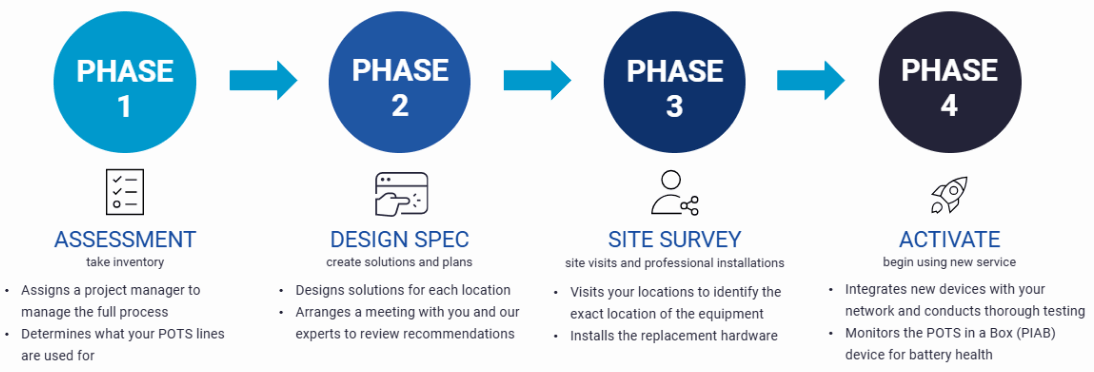
This structure helps businesses think beyond the line itself and focus on the operational function that has to keep working.
Phase 1: Assessment
Understand What You Have
Before replacing anything, figure out what each POTS line actually supports.
Start with carrier invoices, but do not stop there.
An invoice can tell you that a line exists. It may not tell you what is connected to it or how important that device is to the business.
For each location, document:
- Telephone number
- Service provider
- Monthly cost
- Physical location of the line
- Device or system connected to it
- Business owner for that system
- Whether the line supports a critical or life-safety function
- Whether the line is still actively used
Common POTS use cases can include fire alarms, elevator rescue phones, security systems, fax machines, analog phones, and other legacy devices.
And don’t ignore mystery lines. A telephone number that nobody immediately recognizes should be investigated before it is disconnected.
Decide What Actually Needs Replacing
Finding a POTS line doesn’t necessarily mean you need a one-for-one replacement. A fax machine may be a candidate for Hosted Fax while a reception line may be better served by Hosted Voice or another cloud calling platform. A fire alarm or elevator phone may still need an analog interface and a specialized POTS replacement solution. The goal is to understand the business function first, then choose the right replacement.
How Fusion Connect Can Help
Fusion Connect can help review line counts and use cases across locations, identify what those lines support, and begin separating true POTS replacement needs from opportunities to move other services to more modern alternatives.
Phase 2: Design & Spec
Choose the Right Replacement
Once you understand what each line does, the next step is to design the replacement around the requirement. This is where operational, financial, security, and compliance considerations should all come together.
Start With the Operational Requirement
Ask:
- How critical is this device?
- How much downtime can the business tolerate?
- Does it need to work during a power outage?
- Does it need a backup connection?
- Who needs to know if the service stops working?
- Does another vendor monitor or maintain the connected equipment?
The answers can be very different for an occasional fax machine and an elevator emergency phone. That’s why the people responsible for the underlying systems should be involved early - facilities may know something about an elevator line that IT does not or security may own an alarm panel while finance may know why a seemingly unused line still appears on an invoice. The earlier those stakeholders are involved, the fewer surprises are likely to appear later.
Build the Cost Picture
POTS replacement is often driven partly by cost, but comparing only the old monthly line charge to the new monthly service can miss part of the story.
Start by documenting your current environment:
- Monthly line charges
- Taxes and fees
- Maintenance costs
- Equipment costs
- Carrier charges across locations
- Internal time spent supporting legacy services
Then consider the replacement environment:
- Replacement hardware
- Installation
- Project management
- Connectivity
- Battery backup
- Monitoring and support
- Changes required to attached devices
Fusion Connect’s POTS Replacement reduces the cost and complexity associated with legacy landlines while modernizing the underlying technology.
The useful comparison is not simply: What does the old line cost today?
It is: What does it cost to keep this function reliable and supportable over time?
Plan Connectivity and Backup
Traditional POTS earned a reputation for continuing to operate when other systems were unavailable.
A modern replacement needs its own continuity plan.
Depending on the use case, that may involve:
- Wired internet
- Cellular connectivity
- Multiple wireless carriers
- Backup circuits
- Battery backup
Fusion Connect’s POTS Replacement offering uses redundant wired and wireless connectivity with integrated battery backup. Current offer also includes multi-carrier 4G/LTE connectivity and battery backup as part of the solution.
The right design should depend on the importance of the connected device.
A fire alarm or emergency phone deserves a different continuity conversation than a lightly used analog desk phone.
Include Security and Compliance
Modern POTS replacement rely on IP or cellular connectivity rather than a traditional copper circuit
That means businesses should also think about how replacement devices are managed.
Security considerations can include network connectivity, administrative access, credentials, remote management, monitoring, software updates, and whether the device should be segmented from other business systems.
The goal is to avoid solving a copper-line problem while introducing an unmanaged network device.
Compliance can also matter, especially when POTS supports life-safety equipment.
Fusion Connect’s POTS Replacement offering for fire alarms, elevator rescue phones, and other critical systems are designed to support relevant compliance requirements
Businesses should still confirm applicable requirements with their equipment vendors, compliance teams, and local authorities, because requirements can vary by use case and location.
How Fusion Connect Can Help
Fusion Connect can help design a recommended solution by location and use case. Depending on the requirement, that may include POTS Replacement, Hosted Voice, Hosted Fax, or additional wired, cellular, or satellite connectivity.
Phase 3: Site Survey
Verify Before You Install
The physical site tells you whether the plan will actually work. A site survey helps verify things that may not be obvious from an invoice or service record.
That can include:
- Where the existing equipment is physically located
- Available power
- Wired connectivity
- Cellular signal
- Cabling requirements
- Environmental conditions
- Space for replacement equipment
- Access requirements
- Existing alarm, elevator, fax, or other analog devices
- Coordination requirements with third-party vendors
For multi-location businesses, this step can prevent a major problem: assuming every site is the same. They usually are not. A headquarters location may have fiber, backup connectivity, and modern cabling. Whereas a small branch may have a very different environment. The right replacement plan should reflect those differences.
Coordinate the Installation
This phase is also where scheduling and ownership matter.
- Who will provide access?
- Does an elevator or alarm vendor need to be present?
- Does the site require an after-hours cutover?
- Who will verify that the connected device still works after installation?
Documenting those responsibilities before the installer arrives can reduce delays and unnecessary return visits.
How Fusion Connect Can Help
Fusion Connect’s process includes a dedicated project manager, site planning, professional installation, and coordination around the replacement hardware.
Phase 4: Activate
Test the Business Function
A replacement device being online does not mean the migration is finished.
The real test is whether the connected application works.
- For an analog phone: Can it place and receive calls?
- For a fax machine: Can it send and receive documents?
- For an alarm: Can it communicate with the monitoring center?
- For an elevator phone: Does the emergency calling workflow operate as intended?
Where continuity is important, test backup scenarios too.
- What happens when the primary connection is unavailable?
- What happens when commercial power is lost?
- Does the backup connection engage?
- Does the battery perform as expected?
The objective is to prove that the business function works, not simply that the replacement equipment has power.
Establish Ongoing Ownership
POTS lines often sat quietly in telecom rooms for years. A modern replacement should not become another invisible system.
Before closing the project, determine:
- Who monitors the service?
- Who receives alerts?
- Who opens support tickets?
- Who maintains service documentation?
- Who owns future moves, adds, and changes?
- Who is responsible for battery or equipment maintenance?
Fusion Connect’s service model includes ongoing monitoring and support around its POTS Replacement environment.
How Fusion Connect Can Help
Fusion Connect can integrate the replacement device, perform testing, activate the new service, and provide ongoing monitoring and support after deployment.
POTS Replacement Readiness Checklist
Before beginning a migration, make sure you can answer the following.
ASSESS
- ☐ Have we identified every active POTS line?
- ☐ Do we know what each line supports?
- ☐ Have we identified critical or life-safety applications?
- ☐ Have we documented monthly costs?
- ☐ Have we investigated unknown or undocumented lines?
DESIGN
- ☐ Have we determined whether each use case actually needs an analog replacement?
- ☐ Have we reviewed uptime and continuity requirements?
- ☐ Have we considered backup connectivity and power?
- ☐ Have we reviewed security considerations?
- ☐ Have we confirmed any applicable compliance requirements?
- ☐ Have we selected the right replacement path for each use case?
SURVEY
- ☐ Have we verified the physical equipment location?
- ☐ Have we confirmed power, cabling, and connectivity?
- ☐ Have we checked wireless or cellular requirements where applicable?
- ☐ Have we identified any third-party vendors that need to be involved?
- ☐ Is the installation schedule and site access confirmed?
ACTIVATE
- ☐ Has the actual connected device been tested?
- ☐ Have backup scenarios been tested where appropriate?
- ☐ Is monitoring configured?
- ☐ Are support contacts documented?
- ☐ Does the business know who owns future changes?
A POTS Replacement Plan Should Be Simple to Follow
The individual sites and systems may be complicated, but the migration process doesn’t have to be.
- Assess what you have.
- Design the right replacement.
- Verify the site.
- Activate and test.
Fusion Connect can help manage each phase, from the initial inventory through design, installation, testing, monitoring, and ongoing support. For some locations, the right answer may be POTS Replacement. For others, it may be Hosted Voice, Hosted Fax, or a broader connectivity solution. The goal is to keep the business function working with a solution that is easier to manage, better aligned to the use case, and ready for what comes next.